Thanksgiving Bend Dance AI Video Generator
Turn one photo into a Thanksgiving Bend Dance video. Choose portrait or landscape, let AI animate the moves, and download an MP4 to share.
No dancing, filming, or prompt writing required.
From One Photo to a Thanksgiving Dance
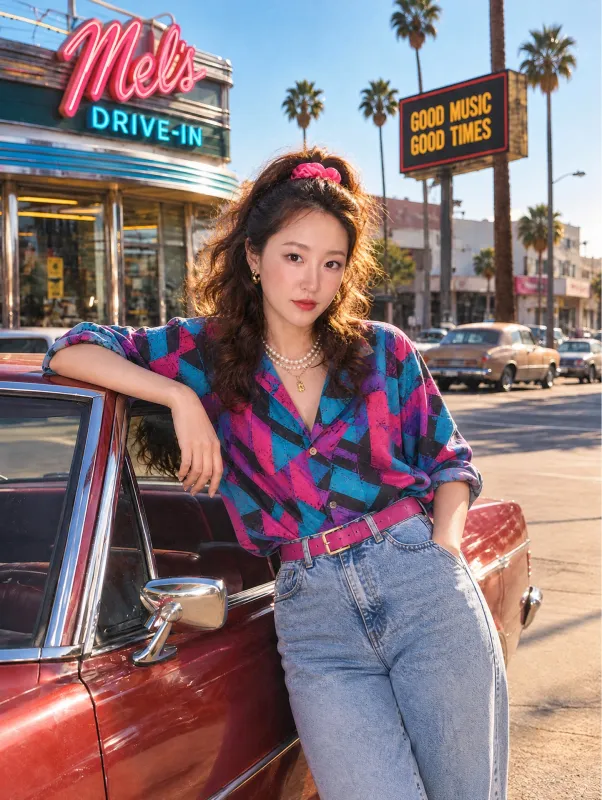
This 13-second example was generated from the photo shown here. Compare the movement and framing before trying your own. Results may vary.
Original photo
AI-generated video
You, Mid-Thanksgiving-Dance
Put yourself in the Thanksgiving Bend Dance with one photo. The preset supplies the choreography, and your photo supplies the character:
- Upload one photo — yourself, or someone who has agreed to appear.
- The AI creates a new performance based on the preset routine.
- Preview the result and download your MP4 in the chosen format.
The example shows a real AI-generated performance. Your result is a new AI video, and its likeness, motion, and framing may vary.
Purupuru Maker — Tool Overview
- Tool type
- Thanksgiving Bend Dance AI video generator
- Input
- 1 photo of one person
- Output
- 9:16 or 16:9 MP4, no watermark
- Cost
- 100 credits per video
- Processing time
- Usually a few minutes
- Account
- Sign-in required to generate
A one-time Starter credit pack costs $9.99 and includes 100 credits. No recurring subscription is required. View credit packs
What is the Thanksgiving Bend Dance AI generator? It turns one photo of a person into a short video of that person performing the viral Thanksgiving Bend dance. Upload a photo, choose 9:16 or 16:9, and Purupuru Maker renders an MP4 you can post on TikTok, Reels, or Shorts (100 credits, usually a few minutes).
How to Make a Thanksgiving Bend Dance AI Video
You don't need to record yourself dancing or upload a reference video. Three steps:
- 1
Upload your photo
Choose one person facing the camera in good lighting (JPG, PNG, or WebP, up to 20 MB). Use a full-body photo with room around the hands and feet to show more of the dance.
- 2
Generate your AI dance
Pick a format and select Create My Thanksgiving Dance. Review the cost and photo permission, then select Confirm and generate to start.
- 3
Download and share
Watch the finished video and download the MP4. Check its audio and make any changes in your editor or social app before posting.
What Is the Thanksgiving Bend Dance Trend?
The routine used by this template combines arm swings, forward bends, bounces, and a knee lift before a hands-on-hips finish. Watch the generated example above to see how the moves appear in a result.
Make it your holiday clip
Use the result as a holiday post or send it to friends and family. The photo-to-video template lets you try the moves without recording yourself dancing.
Thanksgiving Bend Dance vs. Thanksgiving Dance AI
Thanksgiving Dance AI can describe many holiday video effects. This page focuses on the Bend-inspired choreography in the example video, so you can check the moves before generating.
How does your photo become a dance video?
Your photo is the character reference, while the preset video supplies the movement. The AI generates a new clip from those inputs. You do not need to upload a dance reference or write a prompt.
Purupuru Maker is an independent tool and is not affiliated with the trend's creators, the artists behind the remixes, or the social platforms it is posted on.
Why Create Your Thanksgiving Dance With Purupuru Maker?
You don't need to learn the choreography or spend an evening editing. The generator turns one photo into a holiday dance video — here's what that gets you:
One photo is enough
No recording yourself dancing, no reference video, no multiple angles. One clear photo of one person is the entire input.
No prompt writing
The template ships with the routine built in. You never describe a movement, build a prompt, or tune animation settings.
Made for short-form video
9:16 portrait by default, 16:9 landscape when you want it — MP4, no watermark, sized for TikTok, Instagram Reels, and YouTube Shorts.
Keep yourself in the spotlight
Your photo guides the character's appearance. A clear face and unobstructed body help, but likeness and motion can vary.
Create online
Upload, start generation, and download from your browser. No editing app installation is required.
Clear credit pricing
The cost is shown next to the upload button before you confirm — and you can watch the generated example and browse the template for free. Technical generation failures are refunded; safety rejections are charged and are not refunded.
Best Photos for Thanksgiving Bend Dance AI
A good photo makes a visible difference in the final dance. What to aim for:
- Clear, front-facing photos — the face is easy to see and not turned away.
- Good lighting — bright, even light helps the AI keep facial features and clothing consistent.
- Full body, with room to move — include the hands and feet. Tight crops can leave leg movements out of view.
- One main person — a single subject gives a clearer character reference.
Avoid: blurry or low-resolution images, sunglasses, masks or anything covering the face, crowded group photos, and extreme side angles. Don't upload photos of people who haven't agreed to appear.
Tip: pick a photo with clothing you want in the video. The result may vary.
Thanksgiving Bend Dance AI Video Details
| Feature | Details |
|---|---|
| Template | Thanksgiving Bend Dance |
| Input | One photo |
| Video format | MP4 |
| Aspect ratio | 9:16 portrait (default) or 16:9 landscape |
| Watermark | None |
| Generation cost | 100 credits per video, shown before you confirm |
| Processing time | Usually a few minutes |
| Account | Sign-in required |
Is Thanksgiving Bend Dance AI free?
You can open this page, browse the template, and watch the generated example for free. Creating your own video requires credits, and the exact cost is displayed before you generate. Credit packs are one-time purchases — no recurring subscription is needed. View credit packs.
Share Your Thanksgiving Bend Dance on TikTok and Reels
Turn the video into a holiday post, send it to the family group chat, or ride the trend while it lasts. A few captions that work:
Thanksgiving function ready 🦃🍂
I let AI handle the Thanksgiving dance this year 😂
Beans, greens, potatoes, tomatoes… now watch me dance 🕺
POV: The Thanksgiving food is almost ready and the dance floor is already open.
Me showing up to Thanksgiving dinner like… 🦃
Suggested hashtags: #ThanksgivingDance #ThanksgivingBend #AIDance #Thanksgiving2026 #AIVideo
Want to use a different track?
Preview the downloaded MP4 first. If you want a different track, adjust or replace the audio in your editor or social app before posting. Available music varies by platform, region, and account type.
Post It Honestly
Safety rejections are charged and are not refunded. Review this policy and the credit cost before confirming each generation.
Thanksgiving Bend Dance AI — Frequently Asked Questions
What is the Thanksgiving Bend Dance AI trend?+
How do I make a Thanksgiving Bend Dance AI video?+
Can I make the video from just one photo?+
Do I need to know how to do the Thanksgiving Bend Dance?+
How much does it cost?+
Is the Thanksgiving Bend Dance AI generator free?+
Can I post the video on TikTok, Reels, or Shorts?+
Can I change the music before posting?+
What movements does this template use?+
How long does it take?+
What kind of photo works best?+
Can I use someone else's photo?+
Will my video look exactly like the example?+
Do I need to install an app?+
Can I make other AI dance videos too?+
Ready to Join the Thanksgiving Bend Dance?
One photo. One viral dance. Your own AI video — upload a picture and create it with Purupuru Maker.
More trends? Explore more AI trends · AI Dance Generator · Bloodline Dance AI · Nicole Kidman Dance AI